Here is the distinction that prevents the most damaging mistake: googlexxxx.html, a google-site-verification meta tag, and an OAuth credentials.json file do not prove the same thing. The first two prove control of a website. The JSON file identifies an application that wants permission to read Google account data. A Cloudflare challenge answers yet another question: whether the current request looks legitimate enough to continue.
All four can appear while setting up Search Console, which makes “the Google verification file” a dangerously vague label. The practical risk is uploading OAuth credentials to a public site because they were mistaken for an ownership token.
The Omnihex Lab repository configures https://lab.omnihex.xyz/ as its Search Console URL-prefix property. As of September 3, 2026, the live homepage does render Google’s verification meta tag in <head>. The current OAuth refresh returns HTTP 400, however, so this run could not use the API to reconfirm property ownership, submitted sitemaps, or search-performance data. The reporting script reads existing OAuth client information and its refresh token from macOS Keychain; neither the repository nor the generated site stores those values.
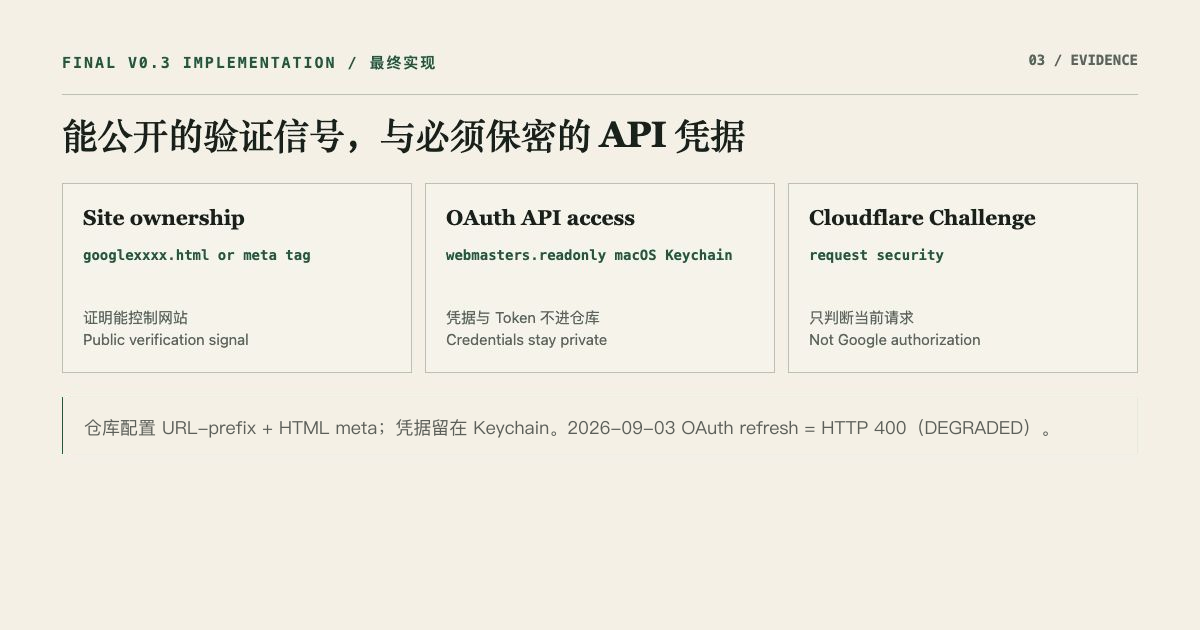
Three artifacts, three questions
1. googlexxxx.html proves control of a file at the site root
For HTML file verification, Search Console provides a file whose name and contents must remain unchanged. You place it at the root of the URL-prefix property. Google requests that exact URL and checks the response.
The file is intentionally public. Its only job is ownership verification. It does not grant Search Console API access and should not contain an OAuth client secret or user token.
This method is straightforward for a static site, but it leaves a dedicated verification file in the published project. Redirect behavior also matters: Google will not follow a verification-file redirect to another domain.
2. The google-site-verification tag proves control of the homepage <head>
The meta method places Google’s token on the public homepage:
<meta name="google-site-verification" content="verification-token" />Google visits the homepage without authentication and looks for the tag in <head>. Like the HTML file, this proves site ownership for a URL-prefix property. It is not an OAuth login and does not read performance data.
Omnihex Lab chose this method because Astro already had one base layout for every page. The code reads PUBLIC_GOOGLE_SITE_VERIFICATION and emits the meta element. Cloudflare supplies the real value as a production environment variable, so the token does not have to be committed to the repository.
Verification is not a one-time copy operation. Search Console periodically checks that the tag remains present. Removing the environment value or the meta output can invalidate ownership.
3. OAuth credentials.json lets an application request API authorization
An OAuth JSON file describes a Google Cloud OAuth client. In this article, credentials.json specifically means the downloaded Desktop app OAuth client configuration, not a similarly named service-account JSON file. It commonly contains a client ID and may contain a client secret, authorization endpoints, and redirect information. An application uses those values to start OAuth 2.0. The user then reviews the requested scope on a Google consent screen, and the application receives tokens for authorized API calls.
That is separate from website ownership. An OAuth client does not automatically own a Search Console property. A verification file does not automatically authorize access to a user’s Search Console data. API calls still require user consent and a valid OAuth token.
Google’s security guidance says client configuration and user tokens belong in secure storage, not source code, public repositories, or public web assets. For a Desktop app, a client secret present in the downloaded file should not be treated as a long-term confidential identity that can stand on its own. Refresh and access tokens remain sensitive because they represent user authorization. This project therefore never publishes credentials.json.
The project’s authorization contract specifies webmasters.readonly. The reporting script does not request a scope again on every run. It reads the existing OAuth configuration, exchanges a refresh token for an access token, and then calls the Search Console API. That exchange currently returns HTTP 400, so the presence of code is not evidence that the read path is healthy today.
Why a Cloudflare security screen can appear in the same setup
A browser may encounter a Cloudflare Challenge when visiting a page protected by Cloudflare WAF, Bot, DDoS, Under Attack Mode, or Turnstile controls. Cloudflare evaluates request and browser signals and may pass the request automatically or ask for a small interaction.
That result is unrelated to all three Google artifacts:
- it does not verify Search Console site ownership;
- it does not create an OAuth client;
- it does not grant a Search Console API scope;
- passing it only means the current request passed Cloudflare’s security check.
“Cloudflare verification completed” is therefore not evidence that Google authorization succeeded. Useful OAuth evidence is a successful callback after consent followed by an actual read-only API request.
Where each value lives in this project
| Item | Purpose | Public web output? | Actual location |
|---|---|---|---|
google-site-verification token |
URL-prefix ownership verification | Yes, in a homepage meta tag | Cloudflare production environment variable |
| HTML verification file | Alternative ownership method | Public if used | Not used by this project |
| OAuth Desktop app client configuration | Identify the API client; a secret in the downloaded file is not an independent identity guarantee | No | macOS Keychain |
| Access / refresh token | Call the API on behalf of the user | No | macOS Keychain |
webmasters.readonly |
Limit the API grant to read access | Shown during consent, not site content | OAuth authorization record |
| Cloudflare challenge state | Decide whether a request passes a security check | Visible only during challenge handling | Cloudflare edge processing |
BaseLayout.astro contains only the logic for emitting the verification meta tag. search-console-report.mjs contains only the logic for retrieving values from Keychain and calling the API. Neither file contains a real credential. That separation keeps the implementation reviewable without turning secrets into build artifacts.
A checklist for keeping the files in the right place
- Name the goal first. Are you proving site ownership or authorizing an API client? Do not download a file before knowing its job.
- Ownership files and tags can be public, but only for verification. Never place client secrets or tokens inside them.
- Keep OAuth JSON in secure storage. Do not upload it to the site, commit it to Git, or paste it into an issue, log, or chat.
- Request the narrowest scope. A reporting tool can use
webmasters.readonly; future possibilities are not a reason to request write access. - Verify the callback and the API read separately. A completed consent screen does not prove that the reporting command can retrieve data reliably.
- Treat Cloudflare Challenge as a separate security layer. Passing or failing it does not modify Google property ownership or OAuth grants.
- Finish with a secret scan. Check the repository, generated output, logs, and screenshots for client identifiers, secrets, tokens, email addresses, and callback parameters.
Where this guidance stops
This implementation covers one personal static site, one URL-prefix property, and a local read-only reporting client. A multi-user organization, a public OAuth product, a server-side authorization service, or a Domain property introduces additional identity, review, and credential-management requirements.
As of September 3, 2026, the local reporting script receives HTTP 400 while refreshing OAuth, so this run produced no new clicks, impressions, or trend data. The current state is OAuth DEGRADED, not zero traffic or an insufficient sample. Existing evidence proves only that the ownership meta tag, repository implementation, and secure-storage boundary exist. It does not prove that the API read succeeds today or support a conclusion that search performance improved.
That is consistent with building the knowledge site before the full knowledge system: use the smallest permission and infrastructure surface that solves the current problem, then expand only when observed use justifies it.